$14.99 $7.50
Build customized sight word worksheets with tracing, phonics, writing, sentences, and literacy practice for Pre-K through grade 2.
Description
Bright Words Studio Web Apps (14.99)
Editable Sight Word Worksheets and Activities for PreK–2
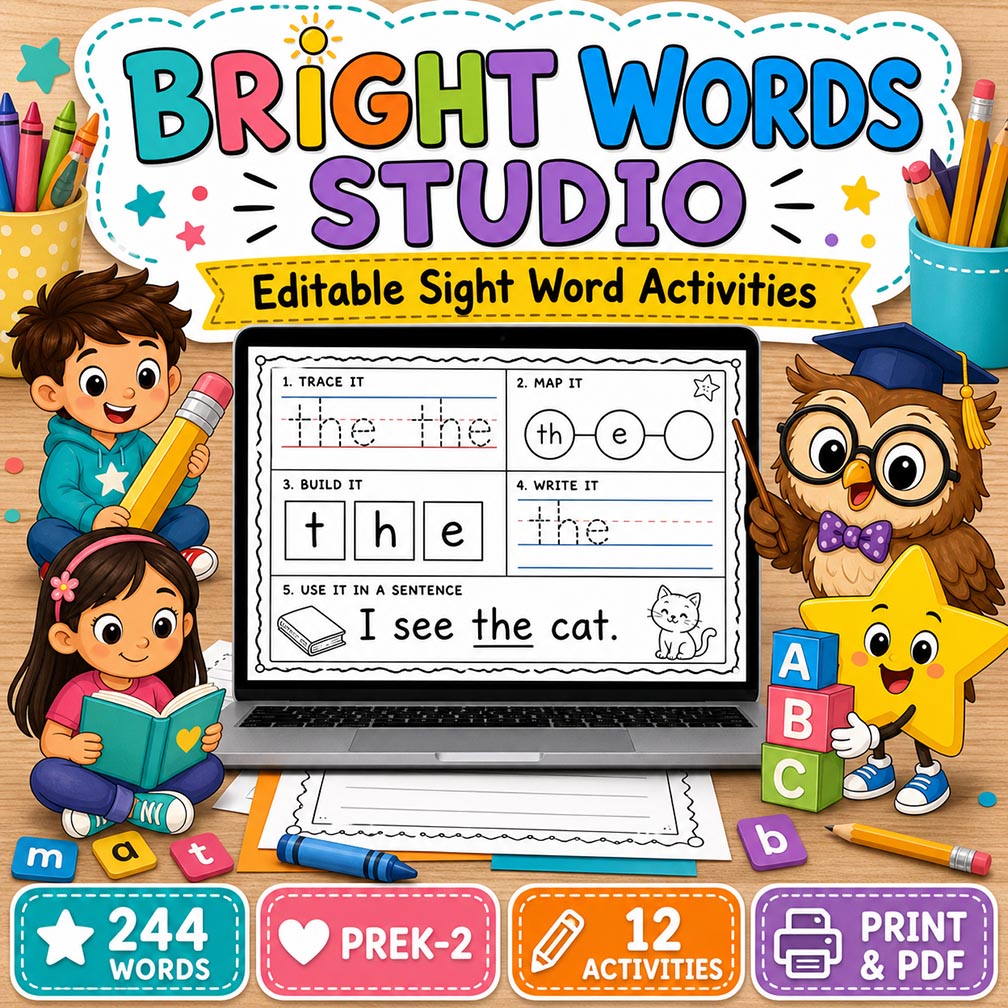
Make sight word instruction easier, more engaging, and more meaningful with Bright Words Studio—an editable digital worksheet builder designed for PreK, Kindergarten, first grade, and second-grade intervention.
This teacher-friendly online tool helps educators create customized sight word activities in minutes. Choose from a built-in library of 244 high-frequency words, select an activity, personalize the instructions and sentence, and print the completed worksheet or save it as a PDF.
Bright Words Studio combines repeated word practice with phonics, word mapping, decoding, writing, sentence comprehension, and fluency-building activities. Its predictable format helps young learners work more independently while giving teachers the flexibility to differentiate instruction.
What’s Included
- 244 built-in high-frequency words
- 12 editable activity formats
- PreK–2 grade-level options
- Word mapping and sound practice
- Tracing and independent writing
- Sentence reading and construction
- Printable mini readers
- Word searches and dot-marker pages
- Cut-and-paste activities
- Letter scrambles
- Word wall cards
- Editable directions and sentences
- Student and teacher name fields
- Original classroom cartoon characters
- Custom accent colors
- Optional teacher answer hints
- Automatic browser saving
- Print and Save as PDF support
- Blank master page option
244 High-Frequency Words
Bright Words Studio includes a broad collection of 244 high-frequency words drawn from commonly taught early literacy vocabulary, including Dolch- and Fry-style practice words, number words, and color words.
Teachers can:
- Search for a word.
- Type their own word.
- Select a random word.
- Move to the next word.
- Use the complete list.
- Organize instruction by a weekly list.
- Create activities for intervention or review.
Because the target word is editable, teachers are not limited to the built-in library. The builder can also be used for names, phonics patterns, spelling words, vocabulary, or classroom-specific words.
12 Editable Activity Types
1. Word Mapping
Students say the word, tap or count its sounds, connect sounds to letters, and write the completed word.
The activity includes:
- Sound circles
- Letter boxes
- Writing lines
- Optional teacher hints
- Phoneme-grapheme practice
This format supports orthographic mapping and helps students connect spoken sounds with written letter patterns.
2. Trace & Write
Students read and trace the target word multiple times before writing it independently.
This activity supports:
- Letter formation
- Word recognition
- Spelling practice
- Fine-motor development
- Independent writing
3. Sentence Builder
Students read the target word in context, arrange words to build a sentence, and write their own sentence.
Teachers can edit the practice sentence to match:
- Student reading level
- Current phonics skills
- Classroom themes
- Decodable text patterns
- Vocabulary instruction
4. Word Search
Students locate and identify the target word inside a letter or word grid.
This activity helps develop:
- Visual discrimination
- Automatic word recognition
- Attention to letter order
- Word-reading fluency
5. Rainbow Writing
Students write the target word using several colors.
Rainbow writing adds a creative fine-motor component while giving students repeated opportunities to spell and read the word.
6. Cut & Paste
Students cut apart letters, arrange them in the correct order, build the word, and write it.
Only logged in customers who have purchased this product may leave a review.

Reviews
There are no reviews yet.