
$14.99 / Year For 1 Year
Create editable morning meeting slides with SEL prompts, vocabulary, puzzles, affirmations, and daily activities for grades K-6.
Purchasing this product will grant you the following membership:
Description
Sunny Start Builder Web Apps (14.99)
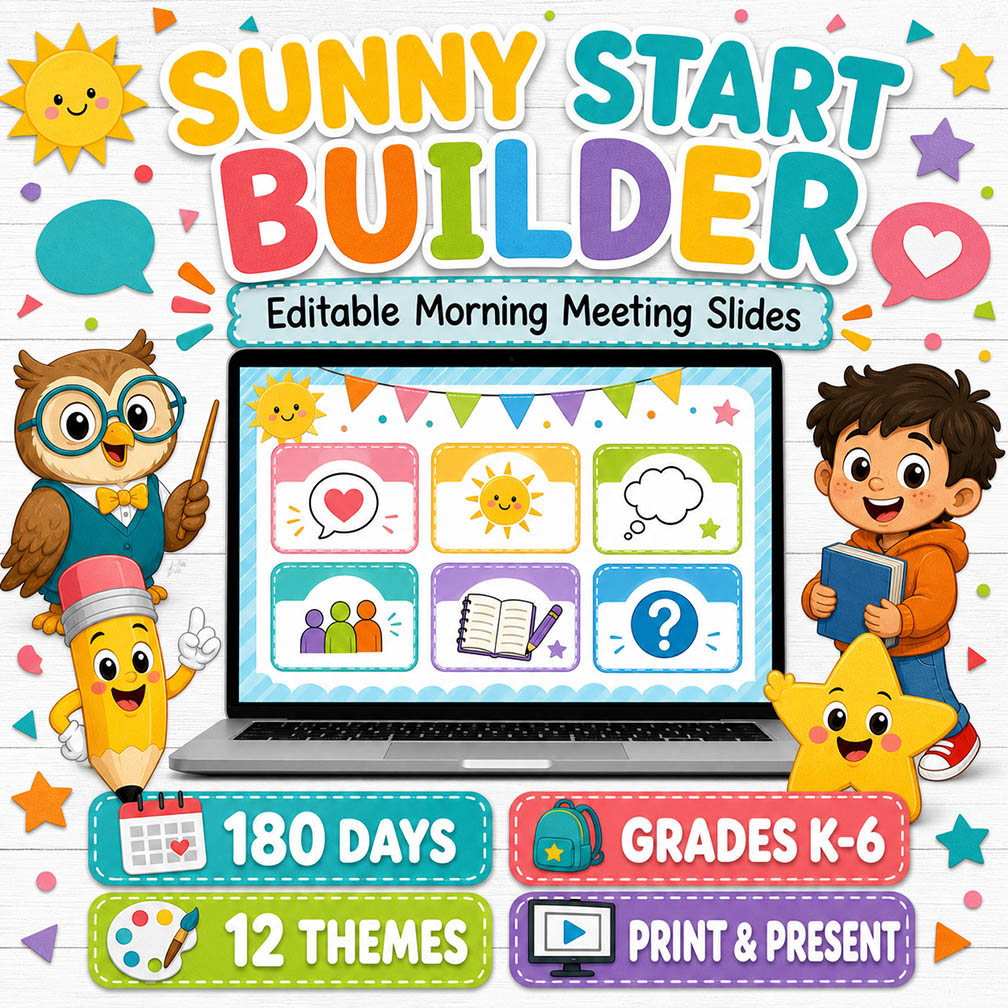
Editable Morning Meeting Slides for Grades K–6
Transform your morning routine into an engaging, positive, and purposeful classroom experience with the Sunny Start Builder!
This easy-to-use digital tool allows teachers to create, customize, present, and print colorful daily morning meeting slides. With space for affirmations, jokes, vocabulary, fun facts, conversation starters, logic puzzles, and words of wisdom, every morning can begin with connection, learning, and a smile.
Designed for Kindergarten through Grade 6, Sunny Start Builder provides a predictable classroom routine while giving teachers the freedom to adapt every activity to their students’ ages, interests, and learning needs.
What’s Included
- 180 independently editable school days
- Content options for Grades K–6
- 12 colorful classroom themes
- Seven daily morning meeting elements
- Interactive answer reveals
- Two differentiated student recording sheets
- Full-screen presentation mode
- Printable classroom slides
- Print-to-PDF support
- Automatic saving on the teacher’s device
- Editable colors, directions, titles, questions, and answers
- Support for SEL, communication, vocabulary, and critical thinking
Seven Daily Morning Meeting Elements
Positive Affirmation
Start each day with an encouraging message that helps students develop confidence, resilience, and a positive mindset. Teachers can edit the affirmation to match a classroom goal, weekly theme, or social-emotional learning focus.
Joke of the Day
Bring laughter into the classroom with a child-friendly joke. Teachers can customize both the question and the answer. The answer remains covered until it is revealed with a click, making the activity fun and interactive.
Vocabulary Word
Introduce a useful academic or high-frequency vocabulary word. Add the word, part of speech, definition, example, or discussion prompt to support language development throughout the year.
Fun Fact
Build background knowledge and curiosity with an interesting daily fact. Use facts connected to science, animals, history, geography, classroom themes, or current units of study.
Conversation Starter
Encourage students to listen, speak, share ideas, and learn about one another. Editable prompts make it easy to support classroom community, discussion skills, and social-emotional learning.
Logic Puzzle
Challenge students with a riddle, number puzzle, pattern, word challenge, or brain teaser. Teachers can enter a separate answer that remains hidden until it is time for the interactive reveal.
Word of Wisdom
End the meeting with a short reflection, piece of advice, or character-building message. This space is perfect for kindness, perseverance, responsibility, teamwork, and growth-mindset reminders.
12 Visual Themes
Keep the familiar morning routine fresh with twelve original classroom themes:
- Colorful Classroom
- Chalkboard
- Outer Space
- Jungle Friends
- Under the Sea
- Superhero School
- Rainbow Bright
- Happy Farm
- Dinosaur Discovery
- Candy Colors
- Four Seasons
- Big Kids Studio
Teachers can choose a theme manually or activate automatic theme rotation so the design changes according to the school day.
The playful themes are especially engaging for younger learners, while the Big Kids Studio offers a cleaner, more mature layout for upper elementary students.
Built for 180 School Days
Each grade includes 180 independently saved days. Teachers can move between days and prepare content in advance without replacing previously created meetings.
Every day stores its own:
- Grade level
- Visual theme
- Positive affirmation
- Teacher or classroom name
- Classroom use
- Joke and answer
- Vocabulary content
- Fun fact
- Conversation prompt
- Logic puzzle and answer
- Word of wisdom
- Colors and display preferences
This makes it easy to prepare an entire week, unit, or school year at your own pace.
Editable for Grades K–6
Sunny Start Builder can be adapted for:
- Kindergarten
- First grade
- Second grade
- Third grade
- Fourth grade
- Fifth grade
- Sixth grade
Use shorter prompts, visual discussions, and simple riddles for younger learners. For older students, add academic vocabulary, deeper reflection questions, multi-step puzzles, and more challenging discussion topics.
The editable format also makes the tool useful for intervention, special education, multilingual learners, and mixed-grade classrooms.
Two Differentiated Recording Sheets
The builder includes two printable student recording sheets.
Primary Recording Sheet
Designed for younger students who benefit from drawing, short responses, and larger workspaces.
Upper-Grade Recording Sheet
Includes structured spaces for vocabulary, written reflection, problem-solving, conversation notes, and daily learning.
The recording sheets are ideal for:
- Student accountability
- Morning work
- Writing practice
- Learning portfolios
- Discussion preparation
- Substitute plans
- Home-school connections
- Small-group instruction
Interactive Classroom Presentation
Use the full-screen presentation mode to display the morning meeting on a classroom screen, projector, or interactive whiteboard.
Jokes and logic puzzles can remain covered while students think, discuss, or vote on an answer. Click the activity card when you are ready to reveal the answer.
The familiar daily format helps students understand expectations while reducing transition time and supporting a calm beginning to the school day.
Print or Save as a PDF
Teachers can print the current morning meeting slide or use the browser’s print menu to save it as a PDF.
This feature is useful for:
- Classroom displays
- Substitute folders
- Emergency lesson plans
- Student packets
- Homework
- Remote learning
- Absent students
- Digital classroom platforms
- Teacher planning records
No specialized PDF software is required.
Automatic Saving
Changes are automatically saved on the teacher’s current device and browser. Teachers can close the page and return later without losing the prepared content stored on that device.
Because this version uses browser-based storage, clearing browser data or switching devices may remove access to locally saved projects. Cloud-based account storage may be offered separately if included with your subscription plan.
Perfect For
- Daily morning meetings
- Bell ringers
- Classroom community building
- Social-emotional learning
- Morning work
- Class discussions
- Vocabulary development
- Critical-thinking warmups
- Brain breaks
- End-of-day reflection
- Substitute plans
- Emergency activities
- Virtual learning
- Small groups
- Intervention
- Fast finishers
- Homeschool instruction
Why Teachers Will Love It
- Saves valuable planning time
- Creates a predictable and reassuring routine
- Encourages positive classroom conversations
- Builds student confidence and community
- Supports language and listening skills
- Makes vocabulary practice consistent
- Adds meaningful critical-thinking opportunities
- Adapts easily to different grade levels
- Keeps students interested with changing themes
- Requires no design experience
- Works directly in a modern web browser
- Makes printing and PDF creation simple
Standards Support
Activities can support the following Common Core State Standards, depending on the content entered by the teacher:
- SL.K–6.1: Collaborative conversations and discussions
- SL.K–6.2: Confirming understanding of information presented
- SL.K–6.4: Reporting and describing ideas clearly
- SL.K–6.5: Adding visual displays when appropriate
- SL.K–6.6: Adapting speech to different contexts
- L.K–6.1: Conventions of standard English
- L.K–6.4: Determining and clarifying word meanings
- L.K–6.5: Understanding word relationships and nuances
- L.K–6.6: Acquiring and using academic vocabulary
- W.K–6.8: Recalling and gathering information from experiences and sources
Standards alignment depends on the teacher’s selected prompts, vocabulary, activities, and grade-level expectations.
How It Works
- Open Sunny Start Builder in your web browser.
- Select the grade level and school day.
- Choose one of the twelve visual themes.
- Personalize the affirmation and classroom information.
- Edit each daily activity.
- Add hidden answers to jokes and logic puzzles.
- Present the meeting in full-screen mode.
- Print the slide or save it as a PDF.
- Print a differentiated student recording sheet when needed.
Frequently Asked Questions
Is the content editable?
Yes. Teachers can change the main affirmation, activity labels, titles, prompts, messages, answers, colors, grade level, classroom use, and teacher information.
Does it include 180 completed morning meetings?
The tool provides 180 independently editable and saved day spaces. Teachers customize the daily content to match their classroom, curriculum, and students.
Can I use it with upper elementary students?
Yes. The tool supports Grades K–6. The Big Kids Studio theme provides a more mature appearance, and all prompts can be adapted for advanced vocabulary, discussions, and puzzles.
Can I download my finished slide?
Yes. Use Print Slide and select Save as PDF in the browser’s print window.
Do students need an account?
No. The teacher operates the builder and presents or prints the finished activities for students.
Do the answers reveal interactively?
Yes. Activities marked “Click to reveal” remain covered until the teacher clicks the card.
Does it work on Google Slides or PowerPoint?
Sunny Start Builder is a browser-based application. It is not a PowerPoint or Google Slides template. Finished pages can be printed or saved as PDF files.
Will my work be saved?
The current version automatically saves work in the browser on the device being used. Cloud saving may depend on the subscription features offered by the website.
Can I use it for substitute plans?
Yes. Print or save the prepared slide and student recording sheet for a substitute teacher.
Technical Requirements
- A modern internet browser
- Desktop, laptop, or compatible tablet
- Internet access to open the hosted application
- A printer or browser PDF option for downloads
- A projector or classroom display for presentation mode
For the best editing experience, a desktop or laptop computer is recommended.
Important Usage Information
This purchase or subscription grants access according to the terms of the website and selected plan. It does not transfer ownership of the application, source files, artwork, design system, or underlying code.
Content created by the teacher may be used with their own students according to the applicable license. Redistribution, resale, sharing access credentials, copying the application, or republishing its designs and source materials is not permitted.
Make Every Morning Count
Sunny Start Builder combines structure, creativity, connection, and learning in one teacher-friendly tool. Build a morning routine students recognize, enjoy, and look forward to—while keeping every day flexible enough to meet the needs of your classroom.
Start each day with a little more sunshine, purpose, and student participation.
Only logged in customers who have purchased this product may leave a review.

Reviews
There are no reviews yet.